什麼是 .emf 檔案
維基百科如此描述:「WMF格式在Microsoft Windows 3.0開始引入,是一個16位元的標準。Windows NT推出時,微軟又推出一個32位元的加強版標準,稱之為Enhanced Metafile(簡稱EMF)。這個加強版除了原有的命令以外,亦新加入一批新的指令。有某幾個牌子的印表機支援列印EMF格式的檔案。」WMF
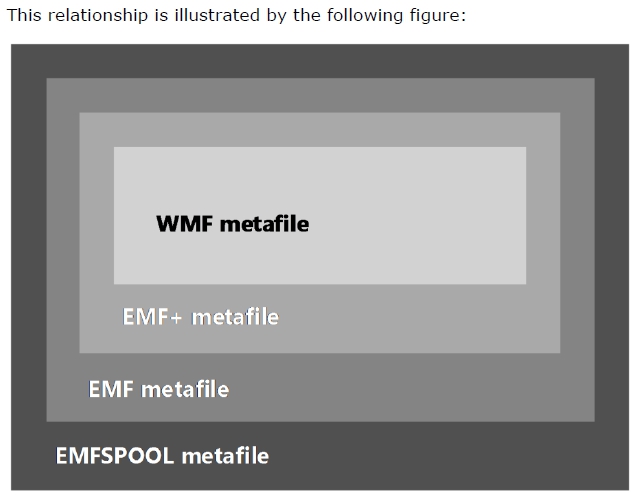
在 MS Office 系統中相互操作,例如先自 Excel 的複製後,再於 Word 中以「圖片」模式貼上,這樣的操作取得的圖片在 Word 中即是以 .emf 格式儲存,之後只要將該 Word 檔以壓縮檔方式解開即可找到。除了 EMF 格式外,微軟還定義了幾種檔案格式 WMF, EMF+ 及 EMFSPOOL 格式,可以從 EMF 規格書中知道這幾個格式的關係。
轉換 EMF 檔案為 PNG/JPG 格式檔案
本節操作來自 KeesTalksTech 作者很用心的將更多的操作放在 GitHub 裡。
- 建立轉換的通用程式
public static void SaveMetaFile(
    Stream source, Stream destination,
    float scale = 4f,
    System.Drawing.Color? backgroundColor = null,
    ImageFormat format = null,
    EncoderParameters parameters = null)
{
    if (source == null)
    {
        throw new ArgumentNullException(nameof(source));
    }

    if (destination == null)
    {
        throw new ArgumentNullException(nameof(destination));
    }

    using (var img = new Metafile(source))
    {
        var f = format ?? ImageFormat.Png;

        /// Determine default background color. Not all formats support t...
        if (backgroundColor == null)
        {
            var transparentFormats = new ImageFormat[] { ImageFormat.Gif, ImageFormat.Png, ImageFormat.Wmf, ImageFormat.Emf };
            var isTransparentFormat = transparentFormats.Contains(f);

            backgroundColor = isTransparentFormat ? System.Drawing.Color.Transparent : System.Drawing.Color.White;
        }

        //header contains DPI information
        var header = img.GetMetafileHeader();

        /// calculate the width and height based on the scale and the res...
        var width = (int)Math.Round((scale * img.Width / header.DpiX * 100), 0, MidpointRounding.ToEven);
        var height = (int)Math.Round((scale * img.Height / header.DpiY * 100), 0, MidpointRounding.ToEven);

        using (var bitmap = new Bitmap(width, height))
        {
            using (var g = System.Drawing.Graphics.FromImage(bitmap))
            {
                //fills the background
                g.Clear(backgroundColor.Value);

                /// reuse the width and height to draw the image in 100% of the s...
                g.DrawImage(img, 0, 0, bitmap.Width, bitmap.Height);
            }

            //get codec based on GUID
            var codec = ImageCodecInfo.GetImageEncoders().FirstOrDefault(c => c.FormatID == f.Guid);

            bitmap.Save(destination, codec, parameters);
        }
    }
}
- 轉換為 PNG 圖檔:
指定預計轉換的 EMF 檔案完整路徑,及轉換後的 PNG 圖檔路徑,透過 File.OpenRead() 讀入為串流物件,即可透過前面的方法轉換。
string sourceFilePath = "MyFile.emf";
string destinationFilePath = "MyFile.PNG";

using (var source = File.OpenRead(sourceFilePath))
{
    using (var destination = File.OpenWrite(destinationFilePath))
    {
        SaveMetaFile(source, destination, 4, System.Drawing.Color.White, ImageFormat.Png);
    }
}
- 轉換為 JPG 圖檔:
轉換為 JPG 格式時,除了必要的檔案串流物件外,還需要額外處理編碼壓縮品質的設定。
string sourceFilePath = "MyFile.emf";
string destinationFilePath = "MyFile.png";

var parameters = new EncoderParameters(1);
parameters.Param[0] = new EncoderParameter(Encoder.Quality, 80L);

using (var source = File.OpenRead(sourceFilePath))
{
    using (var destination = File.OpenWrite(destinationFilePath))
    {
        MetafileUtility.SaveMetaFile(source, destination, format: ImageFormat.Jpeg, parameters: parameters);
    }
}
後記
本來是想透過資訊隱碼方式寫入特定資訊到 Word 的圖檔供作識別之用,但是因為插入的圖檔是來自複製 Excel 內容再以圖片方式貼上 Word 的圖片,所以是 EMF 檔案格式,微軟有提供規格書但是在 .NET Framework 的 Metafile 中似乎並未提供足夠的介面,連 Save 方式都未能回存 .emf 檔案格式,而是 PNG 格式,因為 .NET Framework 的 GDI+ 元件沒有提供對應 .emf 的編碼器,好玩吧!
